

When it is necessary to log into ShareFile fromOutlook the following are the steps:
Confirm that the user is in the ShareFile Users group in IAM: (access can be granted on request)

Remember that this updates at the top of every hour so access is not immediate. The user will need to log off and back on after the top of the hour that you add them to the group!
After the log off and back on, have them open Outlook
They will be prompted to log onto ShareFile or will need to click the icon on the Outlook Toolbar:

They will then get this screen: They should enter dh in the Subdomain box
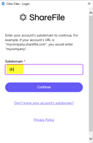
Then press Continue: Next they should click on Sign in with my company credentials
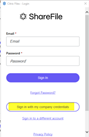
They will then see a Citrix login screen: Enter Window Username (not email address) and Password
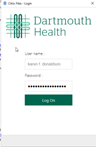
Click Log on and the icon on to turns Blue:

Helpful links:
http://one.hitchcock.org/intranet/departments/help-desk-user-support/services-provided/sharefile
CI = ShareFile
Service Catalog Values = Application Support>How Do I > General Request
Escalation Tree:
Tier 1: IS – Support – Help Desk
Tier 2: IS – Support – LEB Software (Or Regional Support)
Tier 3: N/A

0 Comments